Hindustan Petroleum Corporation Limited
Internship

During my internship at Hindustan Petroleum Corporation Limited, I worked on redesigning four legacy digital platforms: the Alumni Portal, MyHPCL, the Vendors Portal, and the Jobs Portal. Each platform served a different audience and came with its own usability challenges, from cluttered layouts and outdated navigation patterns to dense information structures that made important tasks difficult to complete.
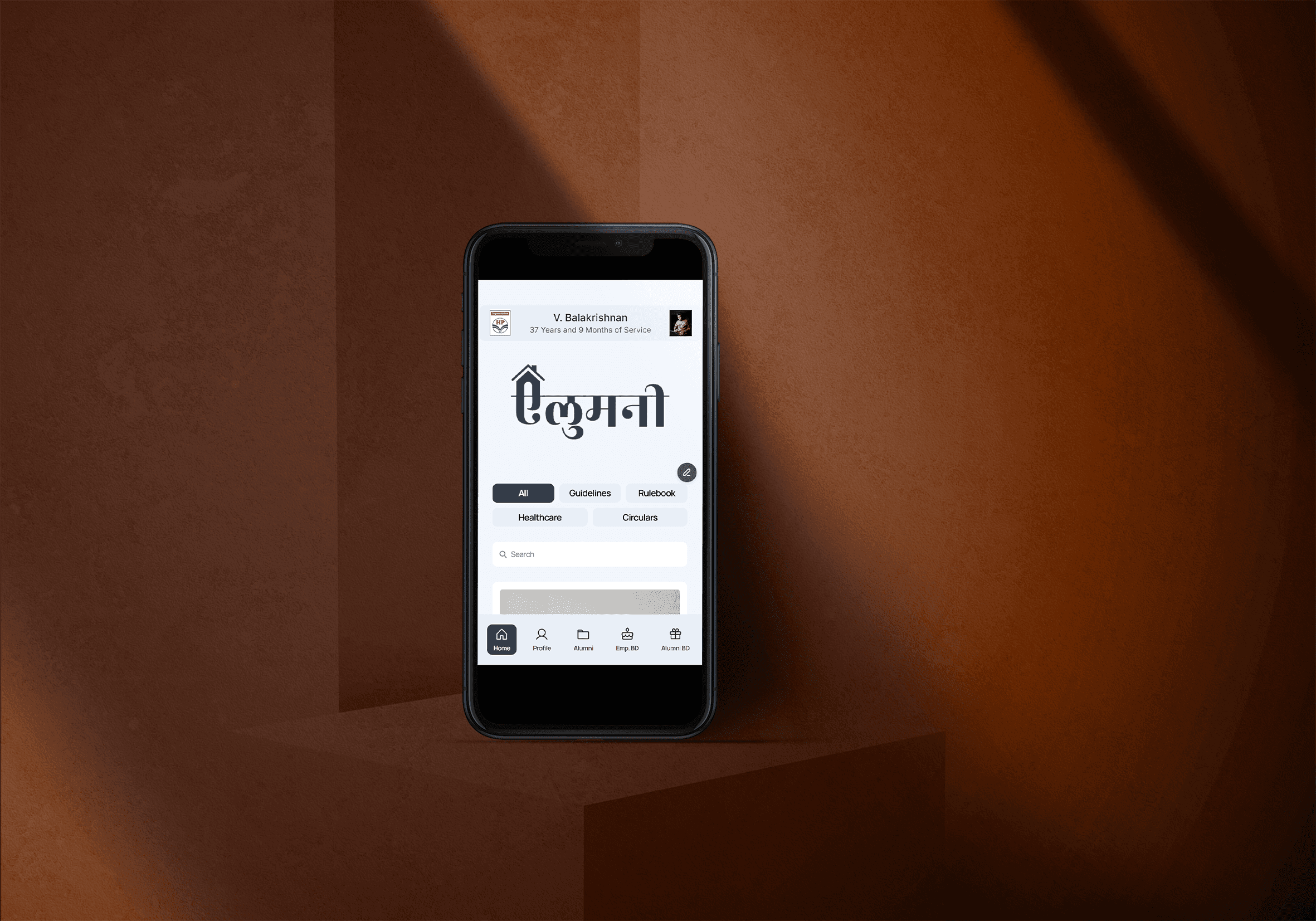
My primary focus was the Alumni Portal, which required a more accessibility driven approach because it served retired employees with varying levels of comfort using digital interfaces. The project involved understanding user needs, simplifying complex information, balancing HPCL’s established brand identity, and creating clearer, more approachable digital experiences across the portal ecosystem.
Organisation:
Hindustan Petroleum Corporation Limited
Role:
UI/UX Design Intern
Duration:
2 months
Project Scope:
Redesigning four legacy digital portals
Primary Focus:
Additional platforms:
MyHPCL, Vendors Portal, Jobs Portal
Primary users:
Retired employees current employees vendors job applicants
Responsibilities:
UX audit, user interviews, information architecture, interface redesign, accessibility considerations, and visual consistency
key Constraints:
Legacy systems, elderly-user needs, dense content, stakeholder preferences, HPCL branding, and confidentiality requirements
Tools Used:
Figma framer photoshop illustrator vs code
This project was completed in an enterprise environment, so selected internal workflows, research details, and interface content have been omitted, blurred, or recreated with representative content. The case study focuses on my design approach, selected screens, and the usability improvements explored during the internship.
HPCL operated multiple digital portals for different user groups, including retired employees, current employees, vendors, and job applicants. Over time, these platforms had become information, heavy, visually outdated, and difficult to navigate.
During my internship, I worked on redesigning four key portals: the Alumni Portal, MyHPCL, the Vendors Portal, and the Jobs Portal. The goal was to modernize the overall experience while making each platform clearer, easier to use, and more aligned with its specific audience.
The Alumni Portal became the primary focus of my work because it served retired employees with varied levels of digital comfort. This made the redesign more than a visual update; it required careful attention to readability, accessibility, familiar navigation patterns, and reduced information overload.
Alumni Portal For retired HPCL employees, with a focus on accessibility, readability, and simpler navigation.
MyHPCL For current employees, with a focus on organizing internal resources and improving everyday usability.
Vendors Portal For external vendors, with a focus on clearer information structure and easier task discovery.
Jobs Portal For applicants, with a focus on making job-related information easier to browse and understand.
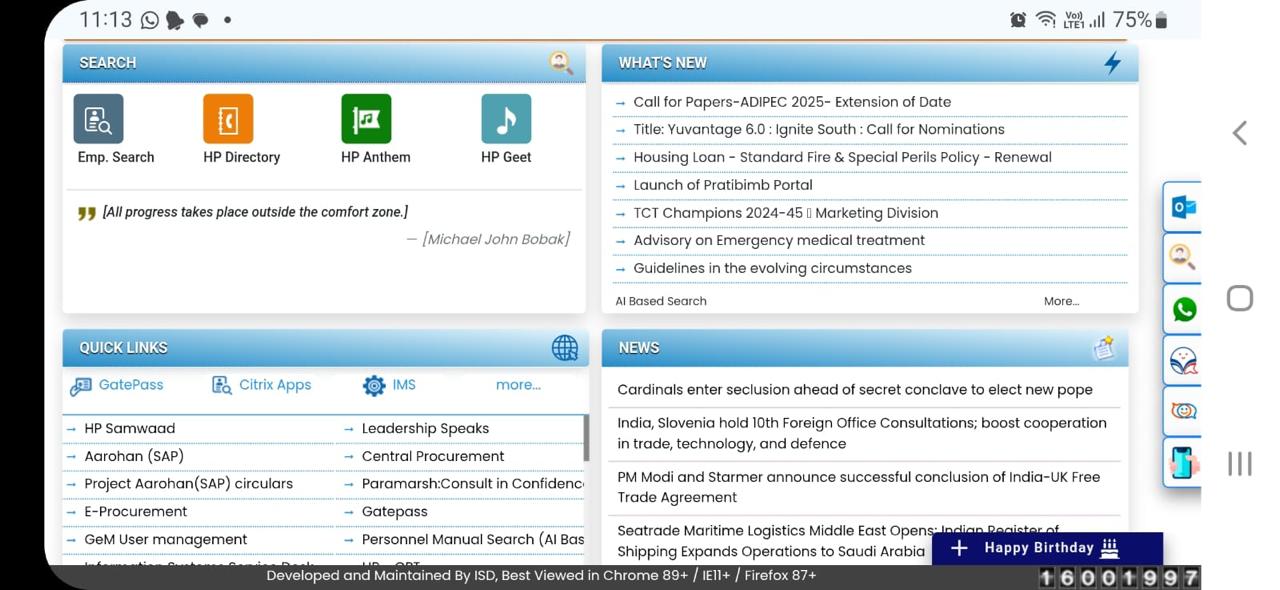
Legacy Portal Screens Before Redesign


Key UX Issues Identified
UX area
Finding / impact
Information density
Multiple links, forms, tables, and notices appeared together, making the pages harder to scan.
Visual hierarchy
Important actions and secondary content often had similar visual weight, so key tasks were not immediately clear.
Navigation clarity
Links and categories were not strongly grouped, which made it harder for users to know where to start.
Readability
Small text, tight spacing, and dense tables reduced reading comfort, especially for older users.
Form usability
Search fields, filters, dropdowns, and buttons felt scattered instead of being part of a guided flow.
Content grouping
Related information was not always organized into clear sections, making the interface feel more like a database view.
Action visibility
Buttons and next-step actions were not always prominent, increasing the chance that users could miss them.
Consistency
Different portals used different layouts and spacing patterns, making the overall ecosystem feel fragmented.
Accessibility
Dense text, small controls, and long pages could overwhelm users with lower digital confidence.
Cognitive load
Too many choices were shown at once, forcing users to mentally filter the page before completing simple tasks.
Before redesigning the portals, I reviewed the existing websites to understand where users were facing friction. The portals had large amounts of information, but the content was not always easy to scan, prioritize, or navigate.
Many pages presented too many links, notices, and actions at once. Important information often competed with secondary content, which made the experience feel cluttered and difficult to follow. The navigation also lacked clear grouping, so users had to spend more time figuring out where to go.
This audit helped identify the main UX issues across the portals: weak visual hierarchy, dense layouts, inconsistent interface patterns, and limited discoverability of important tasks. These findings became the foundation for the redesign direction.
The Alumni Portal served retired HPCL employees, which made the project more sensitive than a standard website redesign. The users had different levels of comfort with digital platforms. Some were confident using websites, while others struggled with interactions that designers often assume are simple.
Through user conversations and observations, I learned that many users preferred clear labels, familiar categories, readable text, and important information placed where it was easy to notice. Some users did not naturally scroll through long pages, while others felt overwhelmed by very modern layouts, too many colors, or icon-only navigation.
The key insight was that the redesign could not simply be “modern.” It had to feel clear, familiar, and trustworthy. For this audience, confidence and readability were more important than visual novelty.

A major challenge was making the Alumni Portal easier to use without making it look too basic or disconnected from HPCL’s identity. The interface needed to feel modern, but still familiar for users who were used to traditional website structures.
I focused on practical accessibility decisions such as readable typography, stronger contrast, clear section labels, visible buttons, and better spacing between content blocks. Important actions were placed more prominently, and the layout was structured to reduce the number of decisions users had to make at once.
The goal was not to remove complexity by hiding everything. The goal was to organize information in a way that felt calm, predictable, and easier to scan, especially for retired users who could feel overwhelmed by dense or unfamiliar interfaces.
Navigating Different User and Stakeholder Preferences
A key challenge in this project was balancing different expectations from users and stakeholders. Some retired users preferred more colors and visible elements because it made the portal feel active and familiar. Others preferred a cleaner and more formal interface with less visual noise.
There were also practical trade offs. Showing every feature on the homepage made the portal feel complete, but it also increased clutter. Using too many colors made the interface look lively, but it reduced readability. More modern layouts looked cleaner, but they could feel unfamiliar to users who were used to traditional website structures.
My role was to translate these different preferences into balanced design decisions. Instead of applying every request directly, I focused on the underlying need behind each request and designed solutions that protected clarity, readability, and consistency.
Accessibility Considerations
Accessibility consideration
Design response
Some users may not recognize hidden navigation patterns like hamburger menus.
Used visible navigation labels where possible.
Icons alone may not clearly communicate meaning.
Paired icons with text labels for better clarity.
Important information can be missed if it appears too far below the first screen.
Prioritized key actions and updates above the fold.
Too many cards can make every section feel equally important.
Created stronger hierarchy between primary and secondary content.
Thin fonts and small text can reduce readability.
Used clearer type weights and comfortable font sizes.
Low-contrast text can be difficult to read, especially on older screens.
Improved contrast between text, backgrounds, and action elements.
Overly modern layouts can feel unfamiliar or less trustworthy to some users.
Balanced modern styling with traditional, predictable structures.
Dense forms can feel intimidating and difficult to complete.
Simplified form sections and improved spacing.
Long paragraphs are difficult to scan
Broke content into shorter sections, cards, and headings.
Support information should be easy to find.
Kept contact, help, or support access visible.
Working Within HPCL’s Brand Constraints
The redesign also had to respect HPCL’s established brand identity. The brand colors were visually strong, so applying them everywhere across the interface could easily make pages feel heavy or difficult to read.
The challenge was to preserve brand recognition while creating a calmer and more accessible digital experience. I used HPCL’s colors more selectively, supported them with neutral backgrounds, and focused on spacing, hierarchy, and contrast to reduce visual fatigue.
The portal also needed to feel formal, trustworthy, and familiar. Since this was an institutional platform, the design could not feel like a trendy consumer product. It had to modernize the experience while still feeling appropriate for HPCL’s users and organizational context.
Reorganizing Information Architecture and Interface Patterns
Beyond the visual redesign, a major part of the project was improving how information was structured. The older portals often presented too many items at the same level of importance, making it harder for users to understand where to begin.
I reorganized content into clearer groups, prioritized frequently accessed sections, and made the homepage function more like a guided entry point instead of a crowded directory. This helped reduce visual competition and made the experience easier to scan.
Across the four portals, I used shared interface patterns such as cards, clear section headers, consistent navigation structures, and reusable content blocks. At the same time, each portal was adapted for its own audience: the Alumni Portal focused on accessibility, MyHPCL on employee resources, the Vendors Portal on task clarity, and the Jobs Portal on discoverability.
Design Tensions
Design tension
Design response
Modern interface vs familiar experience
Kept the layout cleaner while preserving familiar navigation patterns for older users.
More information vs better readability
Prioritized key information and grouped related content into clearer sections.
Colorful appearance vs visual clarity
Used colors selectively as accents instead of applying them everywhere.
HPCL branding vs accessibility
Balanced HPCL colors with neutral backgrounds, spacing, and readable contrast.
Visible features vs reduced clutter
Surfaced primary actions first and moved secondary content into clearer sections.
English-first design vs bilingual familiarity
Used language and labels carefully to support clarity without overcrowding the layout.
Consistency vs portal-specific needs
Created shared interface patterns while adapting each portal to its own users.
Desktop completeness vs limited scrolling
Placed priority content higher on the page and reduced unnecessary page length.
Confidentiality, Outcomes, and Reflection
This project was completed in an enterprise environment, so certain internal workflows, research details, user information, and interface content cannot be publicly shown. Some screens have been selectively cropped, blurred, or recreated with representative content to respect confidentiality requirements.
The redesign work focused on making the portals clearer, more structured, and easier to navigate. Across the platforms, the goal was to improve visual hierarchy, reduce information overload, make important sections easier to find, and create a more consistent experience for different HPCL user groups.
This internship taught me that modernizing a legacy platform is not just about making it look new. It requires understanding real users, respecting institutional constraints, and making careful trade-offs between familiarity, accessibility, branding, and usability. Designing for retired employees especially changed how I think about clarity, confidence, and inclusive digital experiences.


Hindustan Petroleum Corporation Limited
Internship
Hindustan Petroleum Corporation Limited
Internship
During my internship at Hindustan Petroleum Corporation Limited, I worked on redesigning four legacy digital platforms: the Alumni Portal, MyHPCL, the Vendors Portal, and the Jobs Portal. Each platform served a different audience and came with its own usability challenges, from cluttered layouts and outdated navigation patterns to dense information structures that made important tasks difficult to complete.
My primary focus was the Alumni Portal, which required a more accessibility driven approach because it served retired employees with varying levels of comfort using digital interfaces. The project involved understanding user needs, simplifying complex information, balancing HPCL’s established brand identity, and creating clearer, more approachable digital experiences across the portal ecosystem.
Organisation:
Hindustan Petroleum Corporation Limited
Role:
UI/UX Design Intern
Duration:
2 months
Project Scope:
Redesigning four legacy digital portals
Primary Focus:
Additional platforms:
MyHPCL, Vendors Portal, Jobs Portal
Primary users:
Retired employees current employees vendors job applicants
Retired employees current employees vendors job applicants
Responsibilities:
UX audit, user interviews, information architecture, interface redesign, accessibility considerations, and visual consistency
UX audit, user interviews, information architecture, interface redesign, accessibility considerations, and visual consistency
key Constraints:
Legacy systems, elderly-user needs, dense content, stakeholder preferences, HPCL branding, and confidentiality requirements
Legacy systems, elderly-user needs, dense content, stakeholder preferences, HPCL branding, and confidentiality requirements
Tools Used:
Figma framer photoshop illustrator vs code
Figma framer photoshop illustrator vs code
This project was completed in an enterprise environment, so selected internal workflows, research details, and interface content have been omitted, blurred, or recreated with representative content. The case study focuses on my design approach, selected screens, and the usability improvements explored during the internship.
HPCL operated multiple digital portals for different user groups, including retired employees, current employees, vendors, and job applicants. Over time, these platforms had become information, heavy, visually outdated, and difficult to navigate.
During my internship, I worked on redesigning four key portals: the Alumni Portal, MyHPCL, the Vendors Portal, and the Jobs Portal. The goal was to modernize the overall experience while making each platform clearer, easier to use, and more aligned with its specific audience.
The Alumni Portal became the primary focus of my work because it served retired employees with varied levels of digital comfort. This made the redesign more than a visual update; it required careful attention to readability, accessibility, familiar navigation patterns, and reduced information overload.
Alumni Portal For retired HPCL employees, with a focus on accessibility, readability, and simpler navigation.
MyHPCL For current employees, with a focus on organizing internal resources and improving everyday usability.
Vendors Portal For external vendors, with a focus on clearer information structure and easier task discovery.
Jobs Portal For applicants, with a focus on making job-related information easier to browse and understand.
Legacy Portal Screens Before Redesign
Legacy Portal Screens Before Redesign
Key UX Issues Identified
Key UX Issues Identified
UX area
Finding / impact
Information density
Multiple links, forms, tables, and notices appeared together, making the pages harder to scan.
Multiple links, forms, tables, and notices appeared together, making the pages harder to scan.
Visual hierarchy
Important actions and secondary content often had similar visual weight, so key tasks were not immediately clear.
Important actions and secondary content often had similar visual weight, so key tasks were not immediately clear.
Navigation clarity
Links and categories were not strongly grouped, which made it harder for users to know where to start.
Links and categories were not strongly grouped, which made it harder for users to know where to start.
Readability
Small text, tight spacing, and dense tables reduced reading comfort, especially for older users.
Small text, tight spacing, and dense tables reduced reading comfort, especially for older users.
Form usability
Search fields, filters, dropdowns, and buttons felt scattered instead of being part of a guided flow.
Search fields, filters, dropdowns, and buttons felt scattered instead of being part of a guided flow.
Content grouping
Related information was not always organized into clear sections, making the interface feel more like a database view.
Related information was not always organized into clear sections, making the interface feel more like a database view.
Action visibility
Buttons and next-step actions were not always prominent, increasing the chance that users could miss them.
Buttons and next-step actions were not always prominent, increasing the chance that users could miss them.
Consistency
Different portals used different layouts and spacing patterns, making the overall ecosystem feel fragmented.
Different portals used different layouts and spacing patterns, making the overall ecosystem feel fragmented.
Accessibility
Dense text, small controls, and long pages could overwhelm users with lower digital confidence.
Dense text, small controls, and long pages could overwhelm users with lower digital confidence.
Cognitive load
Too many choices were shown at once, forcing users to mentally filter the page before completing simple tasks.
Too many choices were shown at once, forcing users to mentally filter the page before completing simple tasks.
Before redesigning the portals, I reviewed the existing websites to understand where users were facing friction. The portals had large amounts of information, but the content was not always easy to scan, prioritize, or navigate.
Many pages presented too many links, notices, and actions at once. Important information often competed with secondary content, which made the experience feel cluttered and difficult to follow. The navigation also lacked clear grouping, so users had to spend more time figuring out where to go.
This audit helped identify the main UX issues across the portals: weak visual hierarchy, dense layouts, inconsistent interface patterns, and limited discoverability of important tasks. These findings became the foundation for the redesign direction.
Retired employees as users
The Alumni Portal served retired HPCL employees, which made the project more sensitive than a standard website redesign. The users had different levels of comfort with digital platforms. Some were confident using websites, while others struggled with interactions that designers often assume are simple.
Through user conversations and observations, I learned that many users preferred clear labels, familiar categories, readable text, and important information placed where it was easy to notice. Some users did not naturally scroll through long pages, while others felt overwhelmed by very modern layouts, too many colors, or icon-only navigation.
The key insight was that the redesign could not simply be “modern.” It had to feel clear, familiar, and trustworthy. For this audience, confidence and readability were more important than visual novelty.
A major challenge was making the Alumni Portal easier to use without making it look too basic or disconnected from HPCL’s identity. The interface needed to feel modern, but still familiar for users who were used to traditional website structures.
I focused on practical accessibility decisions such as readable typography, stronger contrast, clear section labels, visible buttons, and better spacing between content blocks. Important actions were placed more prominently, and the layout was structured to reduce the number of decisions users had to make at once.
The goal was not to remove complexity by hiding everything. The goal was to organize information in a way that felt calm, predictable, and easier to scan, especially for retired users who could feel overwhelmed by dense or unfamiliar interfaces.
Navigating Different User and Stakeholder Preferences
A key challenge in this project was balancing different expectations from users and stakeholders. Some retired users preferred more colors and visible elements because it made the portal feel active and familiar. Others preferred a cleaner and more formal interface with less visual noise.
There were also practical trade offs. Showing every feature on the homepage made the portal feel complete, but it also increased clutter. Using too many colors made the interface look lively, but it reduced readability. More modern layouts looked cleaner, but they could feel unfamiliar to users who were used to traditional website structures.
My role was to translate these different preferences into balanced design decisions. Instead of applying every request directly, I focused on the underlying need behind each request and designed solutions that protected clarity, readability, and consistency.
Accessibility Considerations
Accessibility Considerations
Accessibility consideration
Design response
Some users may not recognize hidden navigation patterns like hamburger menus.
Used visible navigation labels where possible.
Used visible navigation labels where possible.
Icons alone may not clearly communicate meaning.
Paired icons with text labels for better clarity.
Paired icons with text labels for better clarity.
Important information can be missed if it appears too far below the first screen.
Prioritized key actions and updates above the fold.
Prioritized key actions and updates above the fold.
Too many cards can make every section feel equally important.
Created stronger hierarchy between primary and secondary content.
Created stronger hierarchy between primary and secondary content.
Thin fonts and small text can reduce readability.
Used clearer type weights and comfortable font sizes.
Used clearer type weights and comfortable font sizes.
Low-contrast text can be difficult to read, especially on older screens.
Improved contrast between text, backgrounds, and action elements.
Improved contrast between text, backgrounds, and action elements.
Overly modern layouts can feel unfamiliar or less trustworthy to some users.
Balanced modern styling with traditional, predictable structures.
Balanced modern styling with traditional, predictable structures.
Dense forms can feel intimidating and difficult to complete.
Simplified form sections and improved spacing.
Simplified form sections and improved spacing.
Long paragraphs are difficult to scan
Broke content into shorter sections, cards, and headings.
Broke content into shorter sections, cards, and headings.
Support information should be easy to find.
Kept contact, help, or support access visible.
Kept contact, help, or support access visible.
Working Within HPCL’s Brand Constraints
The redesign also had to respect HPCL’s established brand identity. The brand colors were visually strong, so applying them everywhere across the interface could easily make pages feel heavy or difficult to read.
The challenge was to preserve brand recognition while creating a calmer and more accessible digital experience. I used HPCL’s colors more selectively, supported them with neutral backgrounds, and focused on spacing, hierarchy, and contrast to reduce visual fatigue.
The portal also needed to feel formal, trustworthy, and familiar. Since this was an institutional platform, the design could not feel like a trendy consumer product. It had to modernize the experience while still feeling appropriate for HPCL’s users and organizational context.
Reorganizing Information Architecture and Interface Patterns
Beyond the visual redesign, a major part of the project was improving how information was structured. The older portals often presented too many items at the same level of importance, making it harder for users to understand where to begin.
I reorganized content into clearer groups, prioritized frequently accessed sections, and made the homepage function more like a guided entry point instead of a crowded directory. This helped reduce visual competition and made the experience easier to scan.
Across the four portals, I used shared interface patterns such as cards, clear section headers, consistent navigation structures, and reusable content blocks. At the same time, each portal was adapted for its own audience: the Alumni Portal focused on accessibility, MyHPCL on employee resources, the Vendors Portal on task clarity, and the Jobs Portal on discoverability.
Design Tensions
Design tension
Design response
Modern interface vs familiar experience
Kept the layout cleaner while preserving familiar navigation patterns for older users.
Kept the layout cleaner while preserving familiar navigation patterns for older users.
More information vs better readability
Prioritized key information and grouped related content into clearer sections.
Prioritized key information and grouped related content into clearer sections.
Colorful appearance vs visual clarity
Used colors selectively as accents instead of applying them everywhere.
Used colors selectively as accents instead of applying them everywhere.
HPCL branding vs accessibility
Balanced HPCL colors with neutral backgrounds, spacing, and readable contrast.
Balanced HPCL colors with neutral backgrounds, spacing, and readable contrast.
Visible features vs reduced clutter
Surfaced primary actions first and moved secondary content into clearer sections.
Surfaced primary actions first and moved secondary content into clearer sections.
English-first design vs bilingual familiarity
Used language and labels carefully to support clarity without overcrowding the layout.
Used language and labels carefully to support clarity without overcrowding the layout.
Consistency vs portal-specific needs
Created shared interface patterns while adapting each portal to its own users.
Created shared interface patterns while adapting each portal to its own users.
Desktop completeness vs limited scrolling
Placed priority content higher on the page and reduced unnecessary page length.
Placed priority content higher on the page and reduced unnecessary page length.
Confidentiality, Outcomes, and Reflection